

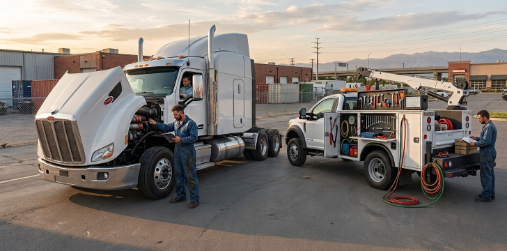
Truck repairs do not always happen inside a repair shop. Fleet technicians may need to respond to breakdowns at a loading facility, on a highway, at a customer location, or somewhere far from the main service center. In these situations, having the right information at the right time can make a significant difference in how quickly the repair is handled.
Mobile operations can become difficult to coordinate when technicians, dispatchers, fleet managers, parts teams, and customers are working from different sources of information. Phone calls, handwritten notes, spreadsheets, and delayed updates can create unnecessary gaps in the workflow. Mobile truck repair software provides a more connected way to manage these moving parts while giving repair teams better visibility into ongoing work.
Rather than treating roadside or field repairs as separate tasks, modern repair operations can use digital tools to bring scheduling, work orders, technician information, maintenance records, and service updates into one organized system.
Why Mobile Truck Repairs Require a Different Approach
A traditional repair shop has a relatively controlled environment. Trucks arrive at a known location, technicians have access to equipment, and service managers can usually walk over to check the progress of a job.
Mobile repair teams work under very different conditions.
Technicians may be traveling between multiple locations throughout the day. A dispatcher may need to assign an urgent job while another technician is already handling a repair. At the same time, fleet managers may need information about the truck’s condition, estimated completion time, required parts, and service history.
Without an organized process, even a straightforward repair can become difficult to manage.
The Cost of Disconnected Repair Information
When information is scattered across different systems, technicians may not have the complete background of the vehicle they are servicing. A dispatcher might have one set of notes, while the fleet manager has another record and the technician receives instructions over the phone.
This can lead to:
- Delayed communication between field technicians and office staff
- Difficulty tracking open repair jobs
- Repeated data entry
- Unclear parts requirements
- Limited visibility into technician workloads
These issues may seem small individually, but they can become significant when a fleet manages a large number of vehicles and service requests.
Bringing Field Service and Fleet Management Together
The biggest advantage of mobile truck repair software is its ability to connect field service activity with the broader repair operation.
Instead of managing mobile jobs as isolated events, repair managers can create a more consistent workflow from the first service request through job completion.
Better Job Scheduling and Dispatching
Scheduling is one of the most important parts of mobile repair operations. The right technician needs to reach the right truck with enough information to understand the job.
Digital scheduling tools can help managers organize assignments according to technician availability, location, workload, and service requirements.
This becomes especially useful when multiple repair requests arrive at the same time. Rather than relying entirely on phone calls or manual coordination, dispatchers can work from a centralized view of current jobs.
Giving Technicians the Information They Need
A field technician should not have to spend valuable time searching for basic information before beginning a repair.
A well-organized system can provide access to important job details, vehicle records, service notes, and repair instructions from a mobile device.
Useful Information at the Job Site
Depending on the system and setup, technicians may be able to access:
- Vehicle and maintenance history
- Work order details
- Customer or fleet information
- Previous repair notes
- Parts information
- Job status and service instructions
Having this information available can make the repair process more organized and reduce unnecessary communication between the field and office.
How Mobile Truck Repair Software Improves Work Order Management
Work orders are at the center of most repair operations. They describe what needs to be repaired, document what was done, and provide a record that managers can review later.
For mobile teams, keeping work orders updated can be more challenging because technicians are not always working from a fixed location.
Mobile truck repair software can help turn work orders into live records rather than static documents.
From Service Request to Completed Job
A typical mobile repair workflow can begin when a fleet manager or customer reports a problem. The service request can then be converted into a work order and assigned to a technician.
As the technician works through the repair, information can be added to the job record. Once the work is completed, the final details can be recorded without requiring the technician to return to the office simply to update paperwork.
This creates a clearer connection between the initial request and the completed repair.
Reducing Administrative Work
Field technicians are hired to diagnose and repair vehicles, not spend large portions of their day handling paperwork.
When repair information can be entered digitally during or immediately after a job, office teams have less manual information to organize later.
That can help create a smoother workflow for both technicians and managers.
Keeping Fleet Maintenance More Organized
Mobile repair operations are often closely connected to preventive maintenance. A truck that receives frequent roadside repairs may have a broader maintenance issue that deserves attention.
Without reliable service records, these patterns can be difficult to identify.
Making Maintenance History Easier to Follow
A centralized repair record can show what work has already been performed on a vehicle. Managers can review previous services, recurring repairs, replaced components, and other maintenance information when planning future work.
This gives teams more context when deciding what should happen next.
Connecting Repairs With Preventive Maintenance
Emergency repairs are important, but they should not become the only focus of fleet maintenance.
Preventive maintenance programs can help fleets schedule inspections and services before certain problems become more disruptive. When repair and maintenance records are connected, managers can use historical information to support better planning.
This is where mobile truck repair software can become part of a larger fleet maintenance strategy rather than simply being a tool for roadside service calls.
Improving Communication Between the Field and Office
Communication problems can slow down mobile repairs just as much as mechanical problems.
A technician may discover that a repair requires an additional part. A dispatcher may need to know whether the job is still active. A fleet manager may want an update before making a decision about a truck’s next assignment.
When every update requires a separate phone call or message, information can quickly become fragmented.
Creating a Shared View of Repair Progress
A centralized repair system gives authorized team members a common place to review job information.
Instead of asking several people for updates, managers can check the status of work orders and review the latest information available in the system.
This can make communication more straightforward, particularly for fleets managing multiple technicians and service locations.
Managing Parts and Repair Resources More Efficiently
A mobile technician may arrive at a job only to discover that the required part is unavailable. That situation can result in another trip, additional downtime, and more scheduling complications.
Parts management therefore plays an important role in mobile repair operations.
Linking Parts With Work Orders
When parts information is connected with repair jobs, service teams can have a clearer understanding of what is needed before or during a repair.
Technicians can document parts used on a job, while managers can maintain better records of repair costs and inventory activity.
Why This Matters for Mobile Teams
A connected parts workflow can help teams:
- Identify required components earlier
- Record parts used during repairs
- Improve inventory visibility
- Keep repair documentation more complete
The goal is not simply to track inventory. It is to make sure parts information supports the actual repair workflow.
Supporting Technicians Without Overcomplicating Their Work
Technology only helps when technicians can actually use it efficiently.
Field technicians already have demanding responsibilities. They may be diagnosing mechanical problems, working in difficult environments, communicating with dispatchers, and trying to complete repairs within practical timeframes.
The software supporting them should simplify those responsibilities rather than add another complicated administrative layer.
Mobile Access Matters
A mobile-friendly system allows technicians to interact with repair information where the work is actually happening.
They can update job details, review relevant information, document completed work, and communicate important service updates without depending entirely on office-based processes.
That mobility is particularly valuable when technicians spend most of their working day away from the main repair facility.
Measuring the Performance of Mobile Repair Operations
Once repair information is organized digitally, managers can gain a clearer picture of how their mobile service operation is performing.
Instead of relying only on general impressions, they can review information related to repair activity and workflow.
Areas Managers Can Monitor
Depending on the capabilities of the system, useful operational data may include:
- Number of completed repair orders
- Open and overdue work orders
- Technician workloads
- Repair history by vehicle
- Parts usage
- Service costs
- Maintenance activity
These records can help managers identify workflow bottlenecks and understand where operational improvements may be needed.
Choosing the Right Software for a Mobile Repair Team
Not every fleet has the same repair process. A small operation with a few technicians may have different requirements from a large fleet with teams operating across multiple locations.
Before selecting mobile truck repair software, businesses should consider how the system fits their existing workflow.
Focus on Practical Functionality
Useful features may include mobile work orders, scheduling, technician dispatching, vehicle service history, maintenance tracking, parts management, and reporting.
The key question is not how many features a platform offers. It is whether those features solve the problems the repair team actually encounters.
Consider Ease of Adoption
A powerful platform can still create problems if technicians find it difficult to use.
The system should be straightforward enough for field staff to update information without spending excessive time navigating complicated processes.
Think Beyond the Initial Setup
Software should also fit into the long-term workflow of the repair operation.
Before making a decision, businesses can consider:
- How technicians will use it in the field
- How dispatchers will manage jobs
- How managers will access reports
- How vehicle records will be maintained
- How the system can scale as the fleet grows
This approach helps ensure that technology becomes part of the operation instead of becoming another disconnected tool.
Building a More Connected Mobile Repair Operation
Mobile truck repair is ultimately about keeping vehicles moving while managing the work required to support them. The challenge is that repairs happen across different locations, often under time pressure and with multiple people involved.
A connected digital workflow can bring greater structure to that environment.
With mobile truck repair software, teams can coordinate work orders, communicate service updates, manage technician assignments, maintain vehicle records, and organize repair information from a more centralized system.
The result is not simply a digital replacement for paperwork. It is a way to connect the people, information, and processes involved in mobile fleet service.
Conclusion
Mobile truck repair operations require flexibility, fast communication, and reliable access to information. When technicians and managers depend on disconnected processes, even routine service work can become harder to coordinate.
Mobile truck repair software provides a way to bring important parts of the operation together, from scheduling and dispatching to work orders, maintenance records, parts tracking, and reporting.
For fleets looking to create a more organized mobile service workflow, the right technology can provide the visibility needed to manage repairs more effectively while giving technicians better access to the information they need in the field. The goal is simple: make mobile repair work easier to coordinate, easier to track, and better connected from the first service request to the final repair update.